
Kizen’s AI Agents: Build, Train & Scale In Under 30 Days. Learn more.
Kizen’s AI Agents: Build, Train & Scale In Under 30 Days. Learn more.
Agentic AI
AI Industries
min read
November 21, 2025
Under the Hood is a Kizen interview-style blog series that highlights innovative, industry-specific solutions built by our team for organizations seeking to transform their workflows with Kizen’s intelligent AI platform.
Today we’ll be highlighting an AI appraisal intelligence tool that eliminates 4–6 hours lenders spend manually comparing data and adjusting appraisals, created by our new VP of Solutions, Jamie Signorile. Jamie is a seasoned solutions leader who has built and led high-performing technology teams in previous roles at Addepar and EY, working with some of the world’s largest financial institutions. Let’s dive into what he created using Kizen and see how lenders can now turn a multi-hour appraisal review into a fully automated, audit-ready process in under a minute.
Hayley: Hey Jamie, can you describe what you built within Kizen in one to two sentences?
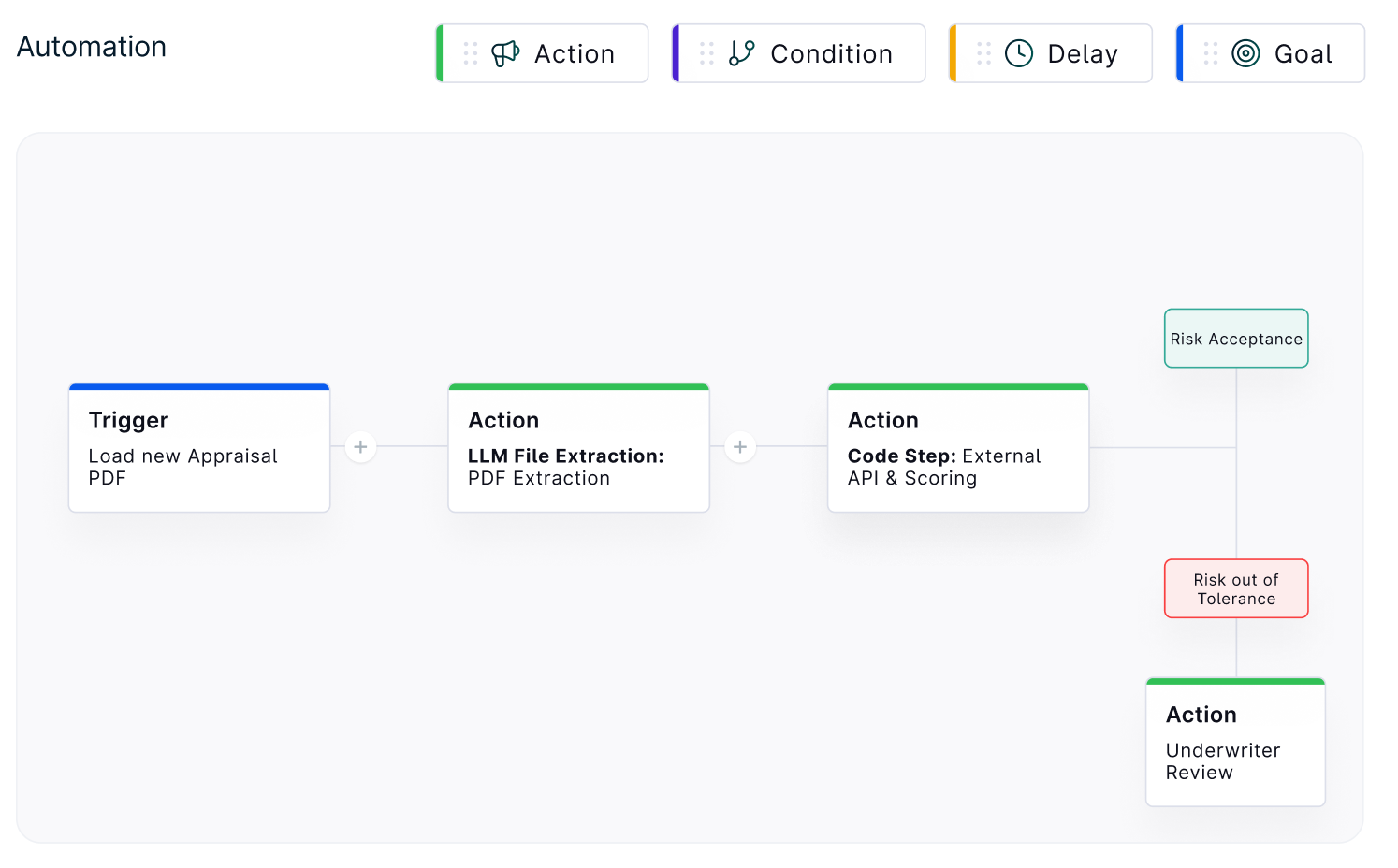
Jamie: Yeah, so this was actually my first time building something in Kizen. I created an end-to-end tool that reads documents, does LLM reasoning, and runs custom code all in one automated flow. I automated a manual appraisal scoring process that can be useful to lenders or firms that want to assess the accuracy of an appraisal in around 40 seconds.
Hayley: And what was the process of assigning a risk score to appraisals manually before?
Jamie: Typically, GSE’s have assigned their own risk thresholds and guidelines for appraisals. Although this is pretty standardized across the industry, this still leaves lenders having to assign their own risk analysis to decide if it is a loan that meets their criteria or not. This leads to a manual review of appraisals and continuous maintenance updates to lender specific risk guidelines.
Hayley: Can you walk me through the automation you created?
Jamie: In Kizen, we have a user-friendly UI that allows you to drag and drop in different actions to construct a workflow. We have a library of different “actions” that serve as a wide-array of “tools” you can use. These vary from LLM calls, custom code steps, field updates & calculations, to custom interactions with your internal team or external customers.
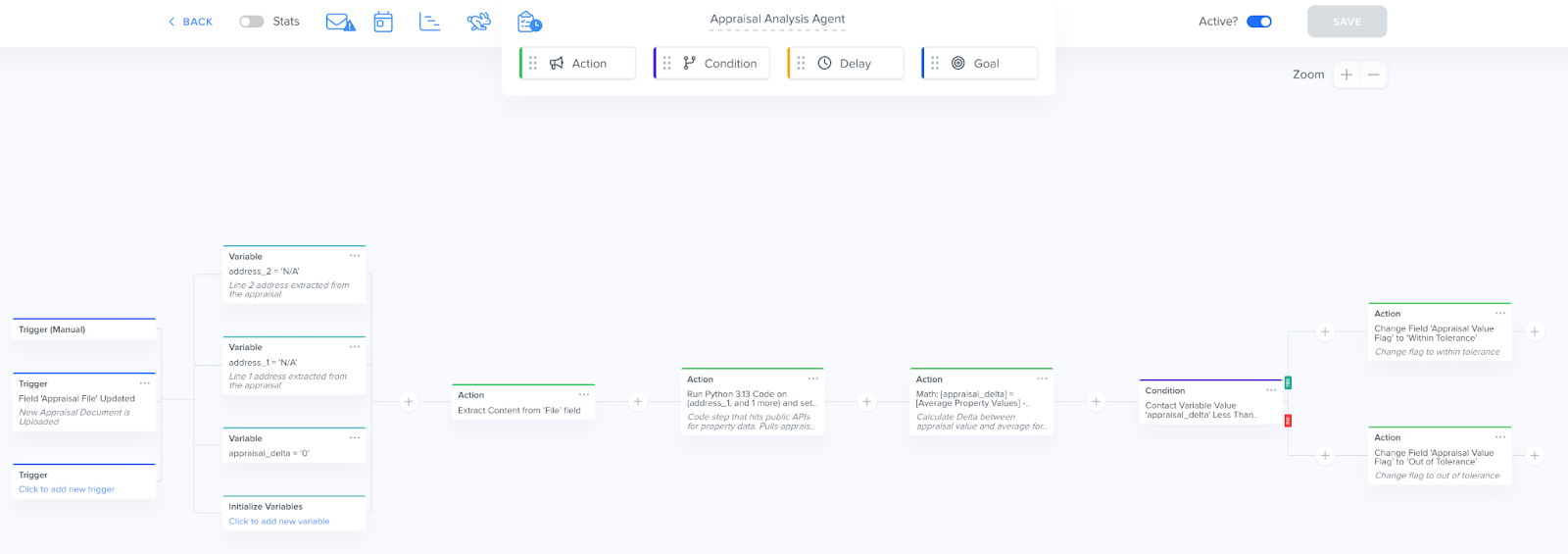
Jamie: In this particular workflow, the first step is to ingest the appraisal file, which can be done in a number of ways. This trigger kicks off the automation. The first thing we're doing is leveraging our proprietary file extraction agent. This is an agent we built to extract information from documents.
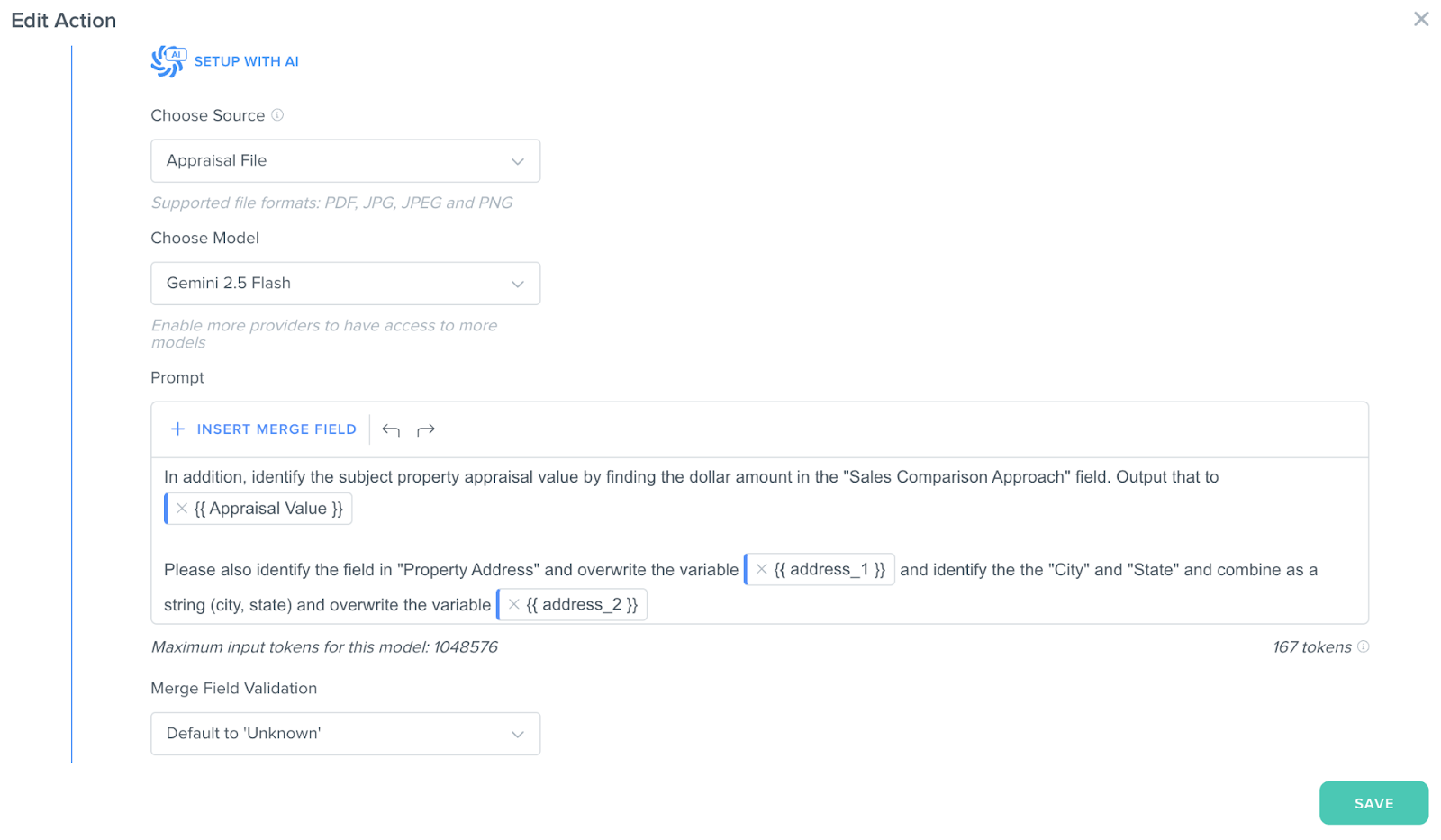
Jamie: Kizen is model agnostic, so our users can choose any model available. Within the prompt, I can specify the exact fields I want to extract from the source document. Our file extraction action allows us to store one or more model outputs as variables. In this case, I am extracting the subject property’s appraisal value and address, but this can be extended to cover any relevant fields from the subject property.
I'm then able to extract those fields and then place them in variables that we're using throughout the workflow or storing in Kizen.
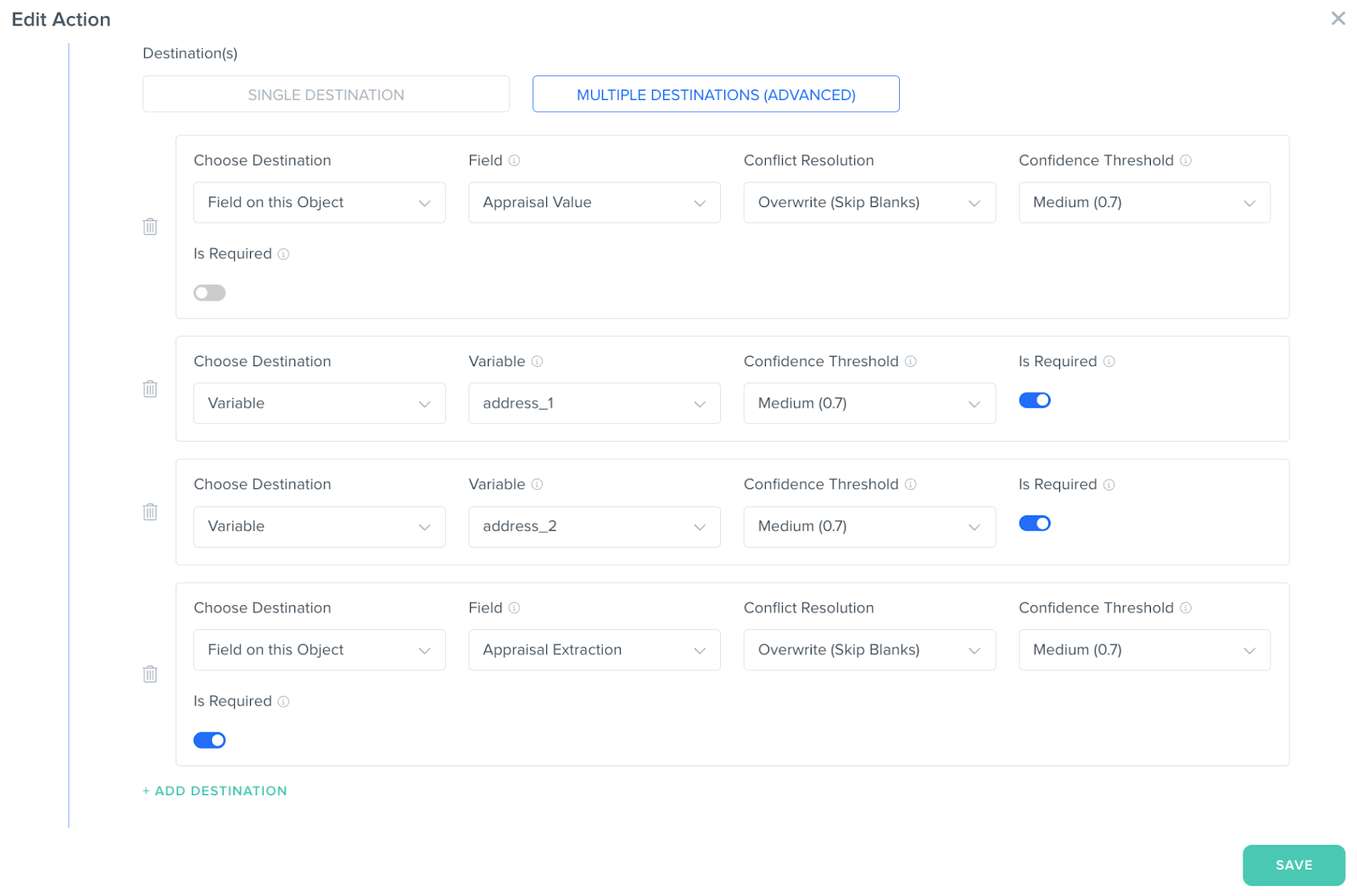
Jamie: So from an audit perspective, we can specify the level of confidence for each of these extraction variables. If the model pulls something out with a confidence below your desired threshold, that's a chance to have a human in the loop to review a specific field for approval. We have this as a way to create guard rails around how we use the models in certain workflows.
Jamie: The next really cool piece is a code step action.
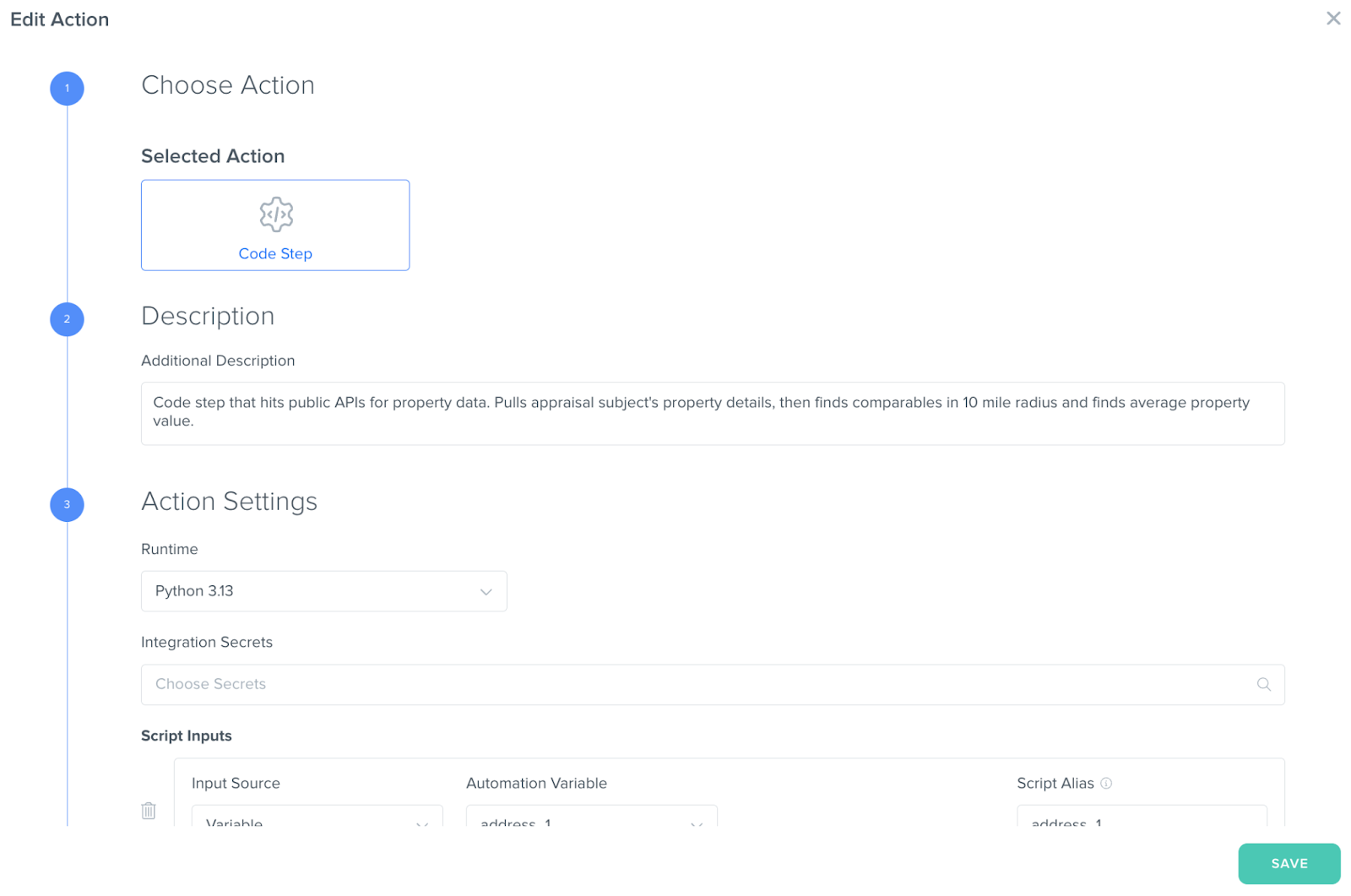
Jamie: This is an opportunity for us to incorporate custom Python code in the workflow. For this, I am taking the appraisal subject property’s information and using a third party API, a property database in this example, to pull information on comparable properties into Kizen. This enables lenders to cross-refence comps with confidence.
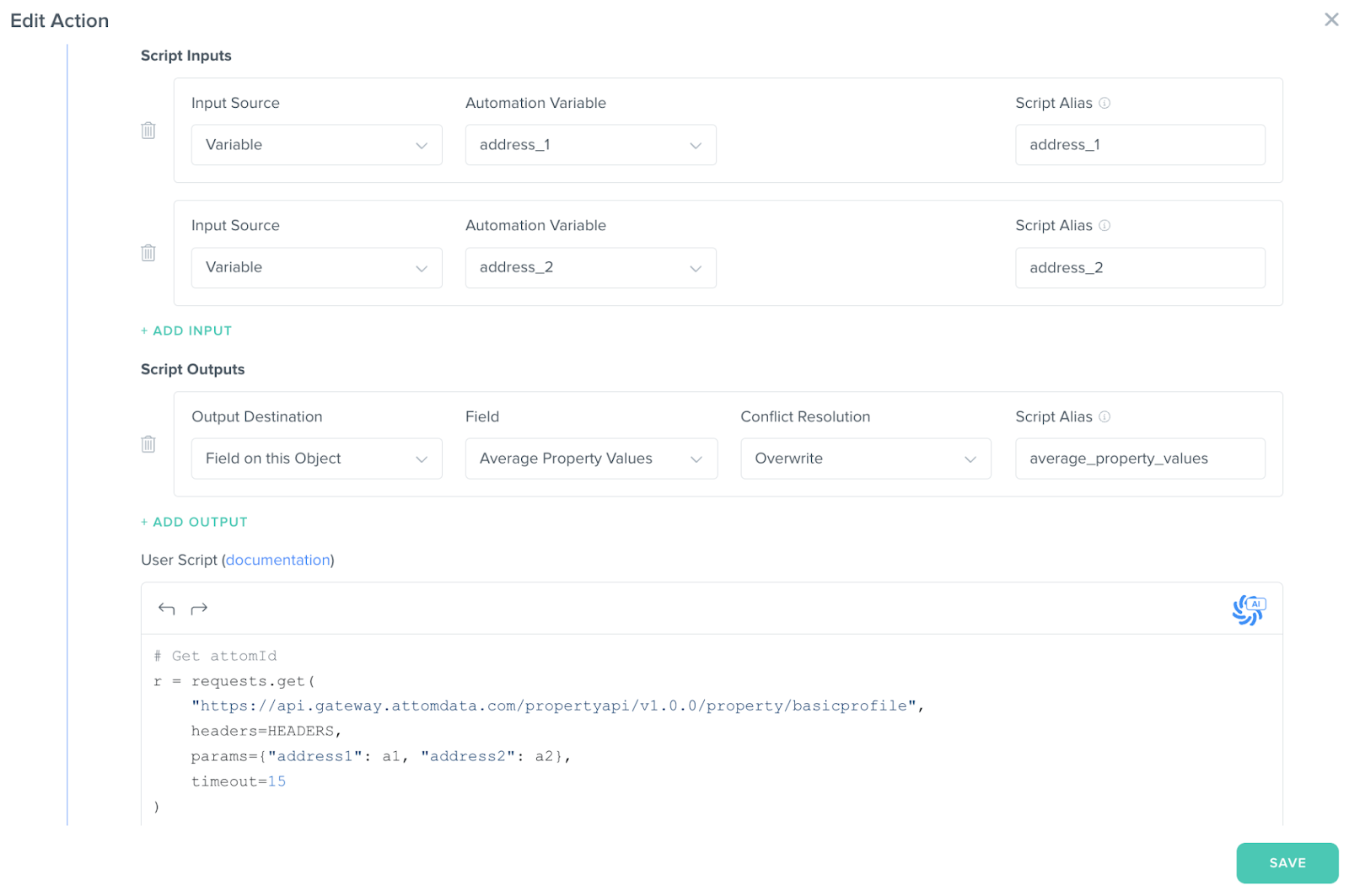
Jamie: In this same step, I can incorporate the lender’s custom risk rules or evaluation logic as well. With the extracted information from the appraisal, the external comparables data, and the lender’s criteria, I can automate any risk scoring and adjustment or value reconciliation needed. Finally, I can kick the results to an appraiser, within a Kizen activity queue, to ensure compliance and final review.
Hayley: Awesome! As you were building this, was there anything that really surprised you about Kizen's platform that stood up to you?
Jamie: Without a doubt, how easy and intuitive it was to drag and drop actions to construct this agentic workflow. The ease of use , combined with the versatility of these building blocks, significantly increases speed to value. I also loved how each automation has a fully auditable timeline so I can track changes and outputs during each run for historical validation. In addition, I would say our file extraction agent is a gamechanger as well. We are not simply calling a foundational model, there is actually way more orchestration going on behind the scenes that helps continually improve/train the model itself.
Hayley: So in other words, you’re saying that Kizen’s file extraction agent adds logic and structure on top of an LLM prompt & subsequent output. There’s this whole orchestration system happening.
Jamie: Exactly. It gives the user the ability to easily control inputs and outputs with granular validation. It can directly integrate LLM outputs with your data model with ease which enables much less configuration and management overhead.
In Summary: Our AI appraisal intelligence tool eliminates the 4–6 hours lenders spend manually comparing data and adjusting appraisals. In under 1 minute, it ingests appraisals, validates comps, calculates adjustments, flags risks, and delivers a lender-ready reconciliation, complete with a confidence score and audit trail. Built on Kizen, it’s configurable in hours instead of months.
Hayley: Can you give us any spoilers into what you’ll be building out next?
Jamie: Absolutely. I am really excited about the work we are doing in the lending space. For our next use case, we will discuss how we can rapidly automate stare & compare workflows as it pertains to the underwriting process. We will also preview a key integration we are building with a loan origination system.
Hayley: Awesome, we’ll make sure to highlight that use case in our next Under the Hood blog to take a deeper look at how it can help enterprise teams augment their manual workflows.
Jamie: Great, thanks!